Style-lock vs content-lock negatives
Negative prompt lists fail when they mix two incompatible jobs — style-lock (blocking rival aesthetics) and content-lock (removing generation defects) require different token types. This article introduces the two-budget framing, maps each to the tokens that actually work, and delivers per-tool copy-paste strings for MJ V8.1, SDXL, Flux dev/Flux 2, and SD3.

Most negative prompt lists do two jobs at once without knowing it. One half is trying to preserve a style — keeping the output inside a visual lane you've established. The other half is trying to remove specific content — artifacts, anatomy errors, unwanted objects. These two goals require different token types, operate on different parts of the generation process, and fail in different ways when overloaded. Mixing them into one undifferentiated 50-word list is the main reason negative prompts backfire.
This article introduces the style-lock / content-lock framing, maps each to the token types that actually work, and gives per-tool copy-paste strings for MJ V8.1, Flux dev/Flux 2, SDXL, and SD3.
The two-job problem
Style-lock negatives block style-breaking competitors. When you want anime line art, the model's default distribution includes countless photorealistic and 3D-rendered images. A style-lock negative doesn't erase those outputs — it shrinks the probability mass allocated to them. The tokens that work are style-descriptor competitors:
photorealism, 3D render, CGI, photograph. These aren't defects; they're rival aesthetics.Content-lock negatives patch specific generation errors. Anatomy mistakes, watermarks, JPEG compression artifacts, extra fingers — these appear when the model's training distribution includes low-quality image-text pairs. The tokens that work are defect labels:
bad anatomy, extra fingers, blurry, watermark, jpeg artifacts. These aren't styles; they're error types.The distinction matters mechanically. Style tokens and defect tokens attend to different features during diffusion. A 2024 ECCV paper (arXiv:2406.02965v1) found that negative prompts' main influence on the output doesn't begin until after denoising step 10 — the first ten steps establish spatial structure. 1 Loading a single softmax budget with both style-competitors and defect-labels means both get diluted. The style-lock tokens get less weight, so the rival style leaks back in. The defect-lock tokens get less weight, so artifacts survive.
Cliprise's cross-model testing in 2026 put a number on the dilution effect: beyond 5 negative terms, models start over-constraining — producing "sterile output or, paradoxically, amplifying the excluded traits." 2 Rephrase's Ilia Ilinskii described the correct model: "Negative prompts still help for image and video when the task is mainly about removing recurring visual errors or aesthetic drift. They are most effective as surgical exclusions layered on top of a strong positive prompt." 3
The 2026 consensus across five independent sources: keep negative prompts to 3–20 tokens total, split deliberately between style-lock and content-lock purposes, and add a new term only after you've observed the specific problem it addresses. 1 2 3
Per-tool breakdown
The framing applies to all four major tools, but the implementation differs significantly. Two of them — SD3 and Flux — don't support classical negative prompts natively, so style-lock and content-lock require different workarounds.
MJ V8.1
MJ V8.1 confirmed official support for
--no as of its April 2026 release. 4 Internally, --no concept is equivalent to a multi-prompt weight of -0.5 on that concept. 5 The key architectural fact: --no suppresses elements and objects, not style types directly. That means style-lock via --no works indirectly — you exclude the objects and aesthetics that would drag the output toward the unwanted style.Known moderation trap: MJ parses each word in
--no independently. --no modern clothing splits into "no modern" + "no clothing," and the latter triggers a nudity filter. Multi-word phrases need to be single tokens or rephrased. 4Style-lock copy-paste strings for MJ V8.1:
Preserve anime / illustration style:
--no photorealism, 3D render, CGI, photo, photograph, cinematicPreserve oil painting style:
--no digital art, vector, flat illustration, 3D render, CGIContent-lock copy-paste string for MJ V8.1:
The 2026 community-validated shortest effective list: 6
--no text, watermark, blurry, extra fingers, bad anatomyCombined (style-lock + content-lock) for MJ V8.1 portrait in illustration style:
your prompt here --no photorealism, 3D render, CGI, photograph, watermark, text, extra fingersSeven tokens total. Style-lock front (first four suppress the rival aesthetic). Content-lock rear (last three patch defects). Under the 5-term threshold per job type, within 20 total.
SDXL
SDXL has the richest negative prompt ecosystem of any current tool, combining text tokens and TI (Textual Inversion) embeddings. The 2026 best practice is 1–2 TI embeddings plus a short text list — not 15+ embeddings. User u/SnarkyTaylor in a widely-cited r/StableDiffusion thread put it directly: "A well trained model should NOT need a paragraph to tell it what bad images look like. It's like shouting 'NO!' fifty times at a dog who's doing fine." 7
Style-lock TI and text combinations for SDXL:
Anime / illustration style — keep it drawn, block photo leakage:
realistic, photo, photograph, 3d render, western cartoon, Disney style, Pixar, EasyNegativeEasyNegative is the standard TI for illustration/anime; it handles baseline quality suppression so the text tokens can focus entirely on style competition. 8Oil painting style — block photographic and digital leakage:
3D, 3D render, photo, cinematic, photography, photograph, award-winning photo, BadDreamBadDream handles the "AI aesthetic" pressure that realistic-output TIs carry. Use UnrealisticDream alongside BadDream only if you're seeing strong plasticky-CGI output — adding both at once often fights the style-lock. 1Content-lock baseline for SDXL (2026 community-validated): 9
worst quality, low quality, blurry, jpeg artifacts, watermark, signature,
bad anatomy, bad hands, extra fingers, mutated hands, poorly drawn face,
deformed, ugly, duplicate, out of frame
XL_NEG embedding: Civitai's highest-downloaded SDXL negative embedding (41,600+ downloads, 222 "Very Positive" ratings). Created by merging existing SDXL negative-concept tokens rather than traditional training. Trigger word:
XL_NEG or XL_NEG-neg. Use it as your content-lock foundation: it covers blur, low detail, and distortion without consuming many text tokens, leaving room for your style-lock text. 10CFG range for SDXL negatives: 5–9. Below 5, negative prompts have minimal effect. Above 9, over-constraint artifacts appear. 1
Weighting syntax:
(term:1.3) is the safe increment. Never exceed 1.5 for a single negative term — values above 2.0 cause the model to over-compensate, generating the suppressed concept more aggressively. 9Combined SDXL prompt (portrait, oil painting style):
Positive:
portrait of a woman in 1880s French countryside, oil on canvas,
impressionist style, visible brushstrokes, warm earth tones,
soft diffused window light BREAK
shallow depth of field, loose framing, painterly atmosphere
Negative:
3D, 3D render, photo, cinematic, photography, (award-winning photo:1.3),
(worst quality:1.3), blurry, watermark, bad anatomy, XL_NEG
Style-lock front (competing aesthetics), content-lock mid (quality), XL_NEG closes. CFG: 7.
Flux dev / Flux 2
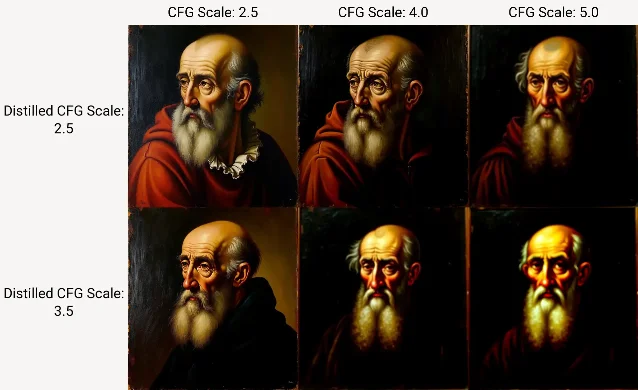
Flux presents the hardest case for both style-lock and content-lock negatives. Black Forest Labs' official stance: FLUX models don't support negative prompts. 11 The reason is architectural: Flux uses flow matching training and is designed to run at CFG=1. At CFG=1, the negative prompt branch has no mathematical meaning — the guidance formula
δX = CFG × X_pos − (CFG−1) × X_neg reduces to δX = X_pos when CFG equals 1. 12A further Flux-specific problem: Flux was trained on VLM-captioned data with detailed captions, making short negative tokens over-powered. As user u/Lishtenbird observed, suppressing
path in a scene will pull away field, forest, grass along with it — short tokens activate large semantic neighborhoods, not just the labeled concept. 12 This makes content-lock negatives particularly unreliable on Flux.Flux style-lock workarounds (in order of stability):
- Positive reframing (BFL-recommended): Describe the style in extreme detail in the positive prompt. For oil painting:
oil painting on linen canvas, thick impasto, artist's brush visible, raw umber shadows, flake white highlights, chiaroscuro from single north-facing window. The more specific the media description, the less room the model has to default to its photorealistic bias. 13 - Low step count (8–10 steps): Flux at 8–10 sampling steps tends to retain painterly texture better than at 20–30, because fewer steps allow the high-frequency photographic detail to resolve. Community-discovered, not BFL-documented.
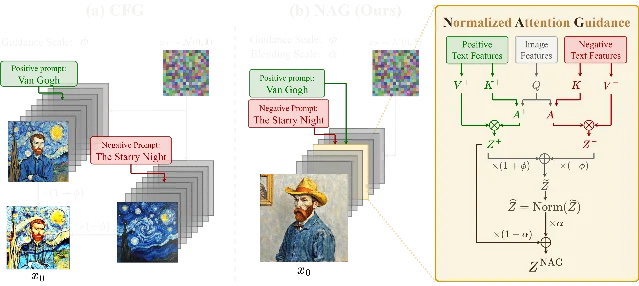
- NAG node in ComfyUI (Beta sampler required): NAG (Normalized Attention Guidance) operates in attention space rather than diffusion space, making it compatible with CFG=1 models. Speed cost on Flux: ~87% overhead per step (comparable to CFG's 100%). Supports both Flux-Schnell (4-step) and Flux-Dev (25-step). 14 Style-lock negative via NAG:
photorealistic, 3D render, CGI, photograph— same tokens as MJ/SDXL but the mechanism differs.
- Dynamic Thresholding with CFG > 1 (Forge / A1111): Set CFG to 3–7 with Interpolate Phi 0.7–0.9, Mimic Scale and CFG Mode both set to "Half Cosine Up." Forge requires distilled CFG > 20 + CFG 1.5. Community consensus: "total hit or miss with no consistency." 12 Use NAG if you need stability.
Flux content-lock breakthrough (May 2026): Seoul National University and Samsung SAIT published Orthogonal Negative Guidance (ONG, arXiv:2605.29390) on May 28, 2026 — a training-free method that orthogonalizes negative-prompt attention features in MM-DiT attention output space, subtracting only the component orthogonal to the positive-prompt features: "suppressing unwanted concepts while preserving desired semantics." 15 On FLUX-dev, ONG's concept suppression beat all prior methods (CFG/NAG/NASA/VSF) by at least 15%, winning human preference evaluations over the runner-up by 18.78%. Published 12 days before this article — no ComfyUI node exists yet. Watch r/FluxAI and r/StableDiffusion for the first community implementation.
Flux style-lock positive reframing template:
[Subject]. [Setting with physical materials — stone, linen, paper, etc.].
[Light source with direction and color temperature, named physically].
[Medium description: brush, pigment, texture, grain].
[Viewpoint and framing in plain English].
Example for oil painting style:
A weathered fisherman mending nets on a harbor dock.
Worn wooden planks, coiled hemp rope, low Mediterranean afternoon sun
from the left casting long warm shadows.
Oil on canvas, thick impasto with a palette knife,
earth tones — burnt sienna, raw umber, titanium white.
Low-angle framing from dock level, wide shot.
SD3 / SD3.5
SD3 is the most constrained tool here. The architecture (MMDiT + triple text encoders) was not trained with negative prompts as a design goal. More critically, Stability AI removed all artist names and artistic movement styles (Art Deco, Art Nouveau, Pre-Raphaelites) from SD3's training data entirely — which means style-lock negatives have almost no semantic foothold. 16 User u/joq100 documented this directly: "not only artists names were removed, but also styles, that includes artistic movements like deco, nouveau, or pre-raphaelites." Community workaround: use SD3 for composition and feed the output into SDXL for style application (two-step pipeline).
SD3.5 improved on this somewhat. Negative prompts exist in SD3.5 but function as a refinement tool, not a primary control. aiphotogenerator.net (Feb 2026) described the behavior: "Negative prompts do work in SD 3.5, but they're more of a refinement tool than a necessity. Use them to fine-tune colors, remove specific elements, or steer artistic style — not to fix basic quality issues." 1 CFG sweet spot: 3.5–5.
An important counter-intuitive finding: removing negative prompts from some SD3.5 prompts improves output quality. The model sometimes interprets the negative prompt's conceptual space and generates something in between positive and negative rather than firmly in the positive direction.
SD3.5 style-lock (positive reframing only):
Rather than
--no photograph, 3D render, write the style into the positive prompt with full material and process specificity. Example for woodblock print style:Japanese woodblock print (ukiyo-e), hand-carved lines,
visible paper grain, flat areas of indigo and ochre pigment,
printed registration marks visible, 19th-century Edo period composition,
no gradient fills, sharp silhouettesSD3.5 content-lock (minimal, surgical):
Keep negative prompts to 5 terms maximum focused on observable errors:
blurry, low quality, watermark, extra limbs, deformedDo not include style-competitor tokens — they have minimal effect and consume the available negative-prompt capacity.
How style-lock interacts with LoRA-based styles (SDXL)
LoRA-based style workflows on SDXL create a specific conflict zone. When you load a style LoRA — say, an anime line-art LoRA — the LoRA's weight deltas push the output toward its trained style distribution. A style-lock negative prompt does something similar but from the negative side. The two can reinforce each other or cancel each other out depending on token overlap.
The core rule: if a style-lock negative token overlaps with the LoRA's training domain, the negative will partially suppress the LoRA. An anime LoRA trained on data that includes
digital art in captions will be weakened by digital art in the negative prompt — the negative is erasing part of what the LoRA learned to emphasize.- Use the LoRA's trigger word in the positive prompt at weight 0.8–1.0 (character-first stacking)
- Keep TI embeddings to 1–2 maximum; beyond 2, embeddings conflict and reduce diversity
- Reserve style-lock negative tokens for aesthetics the LoRA doesn't cover — if your anime LoRA handles the drawing style, your style-lock negative only needs to block the residual leakage the LoRA didn't suppress (e.g.,
photorealistic skin textureif the LoRA handles linework but not shading realism) - Content-lock negatives run independently and don't interact with the LoRA unless the LoRA was trained on defect-containing data (rare)
As sandner.art noted: "If you want a specific style which holds in many scenarios, use (or make) a good LoRA model." 8 The LoRA carries the style; the negative prompt trims the edges. Trying to achieve LoRA-level style fidelity through negative prompts alone requires so many tokens that you trigger the over-constraint problem.
Cross-tool reference table
| Tool | Style-lock method | Style-lock token type | Content-lock method | CFG range | Key constraint |
|---|---|---|---|---|---|
| MJ V8.1 | --no + style-competitor elements | Object/aesthetic nouns | --no + defect labels | N/A (proprietary) | Each --no word parsed independently; multi-word phrases need single tokens |
| SDXL | Text negatives + style-competitor TIs | Style descriptors + TI embeddings | Text negatives + XL_NEG/BadDream | 5–9 | Max 1–2 TI embeddings; weighting cap 1.5; BREAK separates CLIP chunks |
| Flux dev / Flux 2 | Positive reframing only (stable); NAG in ComfyUI (experimental) | N/A — positive tokens only | ONG (arXiv:2605.29390, not yet in community tools); NAG node as fallback | CFG=1 (native) | No native negative prompt; short negatives suppress large semantic clusters |
| SD3 / SD3.5 | Positive reframing only | N/A | Minimal text negatives (≤5 terms) at CFG 3.5–5 | 3.5–5 | Style training data removed; negative prompts are a refinement tool, not a control surface |
The two-job framing resolves a practical confusion: if your negative prompt list isn't working, the first diagnosis is whether you've conflated style-lock and content-lock tokens. Style-lock tokens that land in a content-heavy list get diluted. Content-lock tokens that land in a style-focused list add noise without fixing defects. Separate the two budgets, size each to 3–5 tokens targeting only observed problems, and you recover the attention weight that long mixed lists dissipate.
Loading content card…
References
- 1aiphotogenerator.net: Negative Prompts Explained (2026)
- 2Cliprise: AI Prompt Engineering Guide 2026
- 3Rephrase: When Negative Prompts Still Work in 2026
- 4Midjourney: No – Midjourney (official docs)
- 5Blake Crosley: Midjourney V8.1 + V7 Reference
- 6aiphotogenerator.net: Midjourney V8.1 Practical Prompting (2026)
- 7Reddit r/StableDiffusion: Negative Prompt Tips?
- 8sandner.art: Prompting Art and Design Styles in Flux in Forge and ComfyUI
- 9Neura Market: Negative Prompts for Stable Diffusion — Complete Guide 2026
- 10Civitai: SDXL Negative — XL_NEG embedding
- 11Black Forest Labs: Working Without Negative Prompts
- 12Reddit r/StableDiffusion: Is negative prompt possible in Flux?
- 13Black Forest Labs: Flux 2 Prompting Guide
- 14chendaryen.github.io: Normalized Attention Guidance — Universal Negative Guidance
- 15arXiv:2605.29390: Orthogonal Negative Guidance in Attention Feature Space
- 16Reddit r/StableDiffusion: Let's talk about style adherence in SD3 (spoiler: there isn't any)
Add more perspectives or context around this Post.